
MENUTOUCHMenuTouch
A digital-menu and QR platform for creating a branded, editable experience for food businesses.
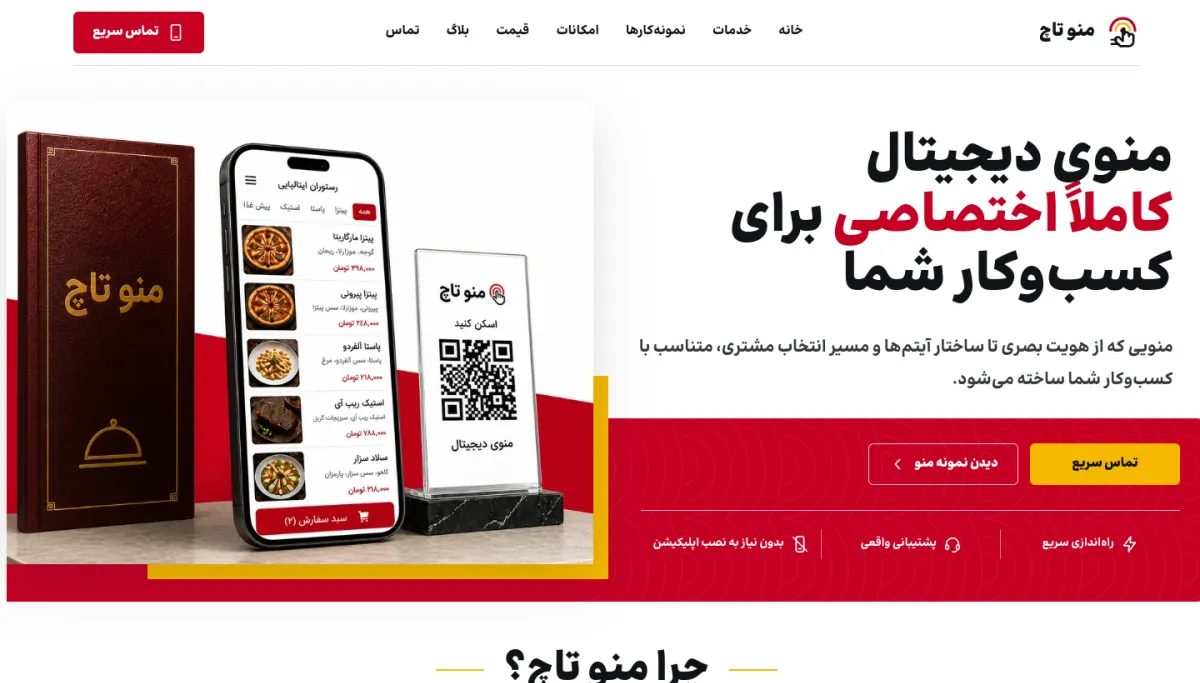
Image from the project’s public version, captured to document this case study.
How does the project work?
The four stages below show the product’s primary flow without exposing sensitive data or details.
- 01 / 04
Creating a menu
Category and item information enters the management structure.
- 02 / 04
Customization
The menu view is aligned with the business’s identity and needs.
- 03 / 04
QR publication
Customers access it in the browser through QR without installing an app.
- 04 / 04
Updating
Price, availability, or content changes are applied without reprinting.
Problem, build, decision, status.
- 01 / PROBLEM
A printed menu or PDF cannot keep pace with daily operations
Price and availability changes should not depend on reprinting or sending a new file; the menu should be a live, manageable asset.
- 02 / BUILT
A QR web menu with three connected layers
The product includes data management, publishing the public version, and the customer’s mobile experience; users enter the menu by scanning a QR code without installation.
- 03 / DECISION
Business control without sacrificing the brand
Updates should stay under the business’s control while the public experience remains fast. Appearance and content must also align with each business identity.
- 04 / STATUS
The product and its presentation path are live
The website and product-presentation path are active. User counts and usage data have not been confirmed for public release, and this page makes no claim about them.
Full project notesOPEN PROJECT NOTES
The menu must be a manageable asset
A printed menu needs revision and reprinting for every price or availability change. A PDF is digital, but delivers a weak mobile experience and is not easy to manage continuously.
MenuTouch was built on the premise that a menu is a live product: it has structure, changes, and should stay aligned with the venue’s brand.
Scan, browse, and choose without installation
Customers enter the web menu directly through QR. The experience must be usable on mobile, with ordinary internet access, and without prior instruction.
Category hierarchy, readable names and prices, and fast access to item information were treated as more important than decorative effects and showy interactions.
Daily changes should not depend on a developer
The product’s value is not only in the customer view. The business should be able to update menu information and retain control over publishing changes.
This separation between content management and public display lets the menu stay aligned with day-to-day business operations.
A digital menu should not make every brand look the same
A fixed template can speed up launch, but if it removes a venue’s identity, the menu becomes an anonymous experience. MenuTouch places alignment of menu appearance and content with each business brand at the center of its offering.
The scope and customization options will be documented with real examples in later versions of the case study.
Three layers: management, publication, and consumption
The product has three connected experiences: a panel where data is maintained, a layer that publishes the public version, and an interface through which the customer chooses.
Product decisions must be assessed across all three layers; a complex panel feature should not slow the public menu.
A live product with clear room to grow
The public site and product-presentation path are active. Details about the number of participating businesses, menu examples, and usage data have not been confirmed for public release.
The next documentation stage will record real examples, setup time, and the menu-update pattern.
What was built within the project scope.
This list is based on project outputs that can be stated publicly—not speculative features or unverified technology.
- 01Product definition
- 02Mobile-menu experience
- 03QR access
- 04Menu-content management
- 05Brand customization
- 06Presentation and acquisition website
- PRODUCT DESIGN
- WEB PLATFORM
- MOBILE UX
- QR EXPERIENCE
- CONTENT MANAGEMENT
Do you have a similar challenge?
If your project sits between web, operations, content, and automation, we can first clarify the problem and the shortest path to build it.
Start a conversation on Telegram